

For many organizations, Microsoft Visual Studio Code has become the standard development environment across teams and technology stacks. Your Natural applications power some of your most critical business processes, so why not develop them in the same environment your developers already use every day?
Natural for Visual Studio Code brings Natural development into Visual Studio Code, giving teams the flexibility to work alongside NaturalONE while leveraging familiar workflows, modern DevOps practices, and existing Natural investments.
Ready to attract and onboard the next generation of Natural developers?
While development teams work across a variety of environments, onboarding new developers often requires them to learn specialized tools and workflows before they can become productive. Giving Natural developers access to Visual Studio Code can simplify onboarding and help new team members become productive faster.
What could your team achieve with a modern Natural development environment?
When development teams are forced to work across disjointed tools, they have to rely on manual processes, custom workarounds, and third-party adapters. This introduces complexity and cost, while new developers struggle to get up to speed. The result is slower onboarding, higher overhead, and a growing skills gap that makes it harder to attract new talent.
Natural for Visual Studio Code accelerates onboarding and task learning while giving teams access to the broader Visual Studio Code ecosystem. Teams can adopt modern DevOps workflows while preserving existing Natural applications and development investments.
BENEFITS OF NATURAL FOR VISUAL STUDIO CODE
 Modernize Development
- Develop Natural in Microsoft Visual Studio Code
- Use a development environment already adopted across your organization
- Support modern DevOps workflows and practices
 Accelerate Developer Productivity
- Onboard new developers faster
- Full Natural language support out of the box
- Leverage the Visual Studio Code ecosystem
 Bridge the Generational Skills Gap
- Attract the next generation of Natural developers
- Give new developers an IDE they already know
- Access the full Visual Studio Code ecosystem
 Schützen Sie Ihre Investitionen
- Keine Neuentwicklung Ihrer Natural Anwendungen
- Adopt modern tooling gradually
- Allow developers to work in NaturalONE and Visual Studio Code simultaneously
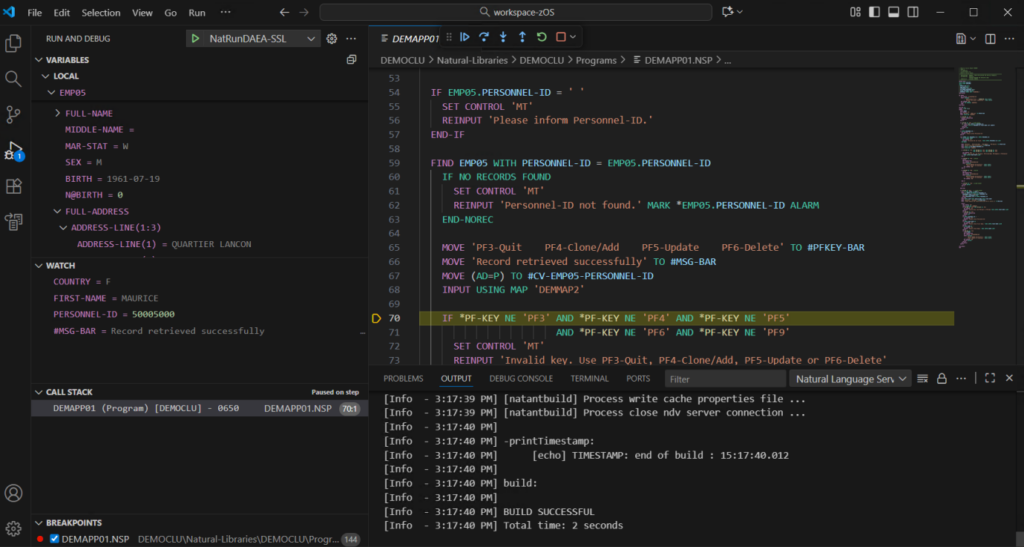
The modern IDE experience built for Natural
Whether you’re looking to attract the next generation of developers, close the skills gap on your Natural team, or take the next step in your modernization journey, Natural for Visual Studio Code meets you where you are. By adding Visual Studio Code as another option for Natural development through a lightweight extension, Natural for Visual Studio Code lets teams work within an environment already used across their development organization while making Natural development more accessible to a new generation of developers.
Wichtige Funktionen
- Give developers the option to work in Visual Studio Code, an IDE many already know and use
- Develop, edit, debug, and navigate Natural code natively in Visual Studio Code
- Connect seamlessly to Natural development environments on z/OS, Linux, and Windows
- Leverage your preferred repositories, extensions, and collaboration tools within Visual Studio Code
- Debug faster with breakpoints, variable inspection, and step-through execution
- Run across Windows, Linux, and macOS using a consistent development experience
- Bring Natural development into standard Visual Studio Code workflows and conventions
Wie es funktioniert
Step 1: Install and Connect
Download the Natural for Visual Studio Code extension from the Software AG Download Center. Install the extension in your existing Visual Studio Code environment on Windows, macOS, or Linux. Configure or reuse your existing Natural development environments on z/OS, Linux, or Windows with minimal setup.
Step 2: Develop with Familiar Tools
Use Visual Studio Code’s built-in features including syntax highlighting, autocompletion, and code navigation to write and edit Natural code.
Step 3: Debug and Test
Debug Natural applications with Visual Studio Code’s debugging tools. Set breakpoints, inspect variables, and step through code to identify and resolve issues quickly.
Step 4: Integrate into Your Workflow
Develop Natural using modern DevOps toolchains, extend functionality with Visual Studio Code extensions, and collaborate using familiar repositories and workflows.
Discover how Natural for Visual Studio Code gives teams the flexibility to work in Visual Studio Code alongside NaturalONE while preserving existing applications, skills, and development practices.
Die Softwareentwicklung modernisieren: Effiziente Prozesse mit APIs und DevOps schaffen
Entdecken Sie, wie die Tel Aviv Stock Exchange (TASE) mit NaturalONE, DevOps-Integration und RESTful APIs die Entwicklung modernisiert und Adabas-Daten sowie Natural-Anwendungen nahtlos zugänglich macht.
Adabas & Natural
Die Software AG arbeitet mit Unternehmen zusammen, um Adabas & Natural-Anwendungen zu modernisieren und durch Strategien zur digitalen Transformation für Effizienz und Zukunftsfähigkeit zu sorgen.

Natural for Visual Studio Code
The modern development experience built for Natural applications.